

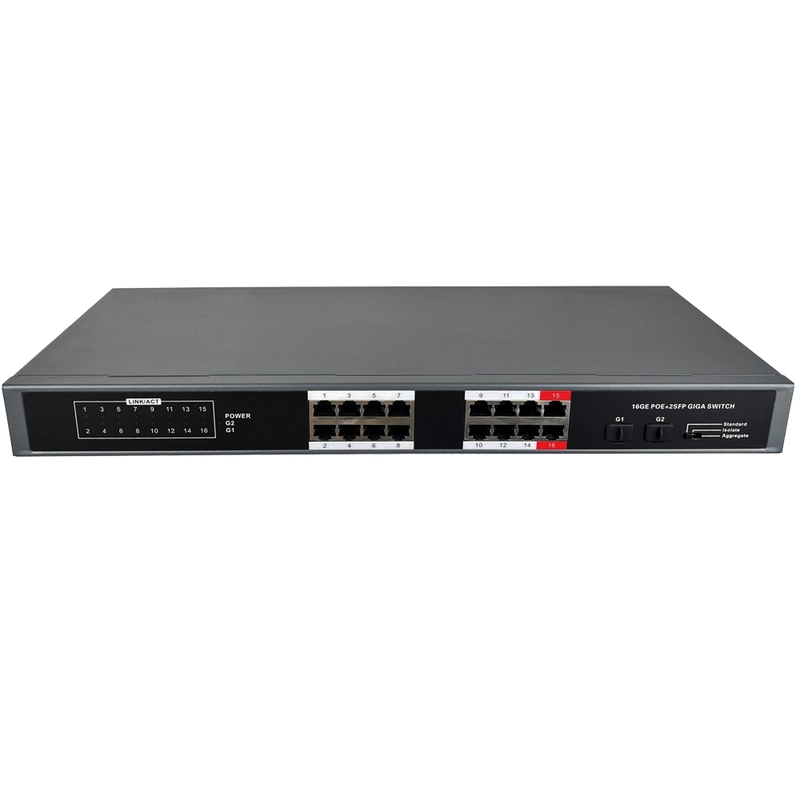


- 16× PoE+ Ports + 2× SFP Uplinks: Ideal for large‑scale IP surveillance, dense Wi‑Fi AP deployments, and fibre core connectivity.
- 260W High PoE Budget (30W/Port): Simultaneously powers power‑hungry devices, eliminating messy external power cabling.
- 3‑Mode DIP Switch: Choose “Standard” (full communication), “Isolate” (downstream ports isolated from each other, only uplinks communicate), or “Aggregate” (bundles the two copper and two fibre uplinks into LAG groups for increased bandwidth and redundancy).
- Plug‑and‑Play – Zero Configuration: Unmanaged design auto‑detects PDs for fast, hassle‑free deployment.
- Active Cooling with Optimised Airflow: Fixed fan draws cool air from the power supply side and exhausts hot air from the opposite side, ensuring stable operation even under full 260W load.
- Durable IP30 Metal Chassis: Robust, dust‑resistant, wide operating temperature (-10°C to 50°C); standard 19‑inch rack‑mount size (440mm) also supports wall or DIN‑rail mounting (accessories sold separately).
- High‑Performance Backplane: 36Gbps switching capacity, wire‑speed forwarding, and 9.2K jumbo frame support for non‑blocking data throughput.
Plug Type
$626.57
Specifications
Ratings & Reviews
Specifications
Specifications
Product Overview
- Product Type16x Non-Managed Gigabit POE Fiber Switch
- Product ModelON-PFS-16G2F
Technology
- StandardsIEEE 802.3 10Tx Ethernet; IEEE 802.3u 100Tx Fast Ethernet; IEEE 802.3ab 1000Tx Gigabit Ethernet; IEEE 802.3af/at Power over Ethernet; IEEE 802.3z 1000BASE-X Gigabit Ethernet
- Processing TypeStore and Forward
- Flow ControlIEEE 802.3x back pressure flow control
Switch Properties
- Switch ArchitectureBack-Plane (Switching Fabric): 36.0Gbps
- Packet Forwarding Rate26.784 Mpps
- Packet Buffer4.1Mbits
- Jumbo Frame/
- MAC Table Size8K
Port Interface
- Ethernet Port16*10/100/1000Tx (PSE: 30W/Port), Auto negotiation speed, Full/Half duplex mode, and auto MDI/MDI-X connection
- SFP Port2x SFP slots
Mechanical Characteristics
- Housing MetalIP30 protection
- Unit Weight2.7kg (5.95 lbs, 95.24 oz)
- Shipping Weight3.2kg (7.05 lbs, 112.88 oz)
- Unit Dimensions440 × 210 × 44 mm (17.32 × 8.27 × 1.73 in)
- Package Dimensions510 × 300 × 90 mm (20.8 × 11.81 × 3.54 in)
- Mounting OptionsDIN-rail mounting(Excluded), Wall mounting(Excluded)
Power Requirement
- Rated Input Voltage100Vac~240Vac/47Hz~63Hz
- Input Voltage Range90Vac~264Vac
- Fuse Current6.3A/250V, 10A/250V
- System Power Consumption(Idle)Less than 5.5W(Idle)
- System Power Consumption(Full Load)Less than 280W(Full Load)
- Power PinoutPairs 1/2/4/5 (+), Pairs 3/6/7/8 (-)
- Max PoE Power Budget260W
- PoE Power Output30W max. per PoE port
Environmental Specifications
- Operating Temperature-10°C to 50°C (14°F to 122°F)
- Storage Temperature-10°C to 50°C (14°F to 122°F)
- Operating Humidity10% to 95% RH (non-condensing)
Power Status Indicator
- Illuminated Green (Steady)Indicates that the switch has passed all internal power-on self-tests and is functioning correctly.
- OffIndicates a lack of power input or a critical fault in the power supply unit.
SFP Port Status Indicator Light
- Steady Green IlluminationIndicates that the link is successfully established at the physical layer.
- Blinking GreenIndicates that the port is actively processing (receiving or transmitting) data packets.
- No IlluminationIndicates that no link is detected. The SFP module may be absent, faulty, or the cable may be disconnected.
Ethernet Port Status Indicator (10/100/1000BASE-T)
- Steady GreenIndicates a successful physical layer connection (Link Up) at the negotiated speed (10, 100, or 1000 Mbps).
- Flashing GreenIndicates active data transmission or reception on this port.
- OffIndicates that no link is established. The cable may be unplugged, the connected device may be off, or there may be a fault.
Ratings & Reviews